Operate · TMC-React

The answer shouldn't be buried in a folder of PDFs.

TMC-React gives traffic management center operators instant access to SOPs, contacts, and responder routes — with every answer cited and every question logged.

60+ operators using TMC-React across all shifts — 24/7 operations
600+ pages of SOPs, contact records, and responder route maps indexed and searchable
15 min sync interval — when an SOP changes, the tool reflects it within 15 minutes
The Problem

TMC operators make high-stakes decisions with information scattered across multiple systems.

When an incident happens, TMC operators need to know: what does the SOP say? Who's the right contact? Which responder group covers this corridor? The answers exist — they're in a folder of PDFs — 600 pages of SOPs — a spreadsheet of 3,500 contacts, and the memory of whoever's on shift tonight.

The knowledge is there. But in an incident, you don't have time to find it. Those lanes need to be reopened. By the time a new operator hunts through three PDFs looking for the right section, the situation has changed.

TMC-React doesn't replace the SOPs. It makes them searchable, citable, and reachable in seconds.

Real query, 2am
"Should a RAVE text be sent for all lanes blocked in both directions on a state route?"
TMC-React returns the specific RAVE alert criteria from the SOP, confirms whether notification thresholds are met, and links directly to the source page — in under 3 seconds.
↗ RAVE Alert SOP, Section 4.2 — view source
Three ways to ask

Built for how operators actually work.

Operators can ask anything. TMC-React routes the question to the right source and always shows where the answer came from.

SOP Questions

Ask anything about procedures

Free-form chat grounded in your SOPs. Type a question the way you'd ask a senior operator — and get back a cited answer from the actual document. Every response links to the source page.

"What's the procedure if a wrong-way driver is reported on I-285?"
Contacts

Find the right person fast

Search by name, role, county, or corridor. TMC-React pulls from 6–7 contact sources simultaneously and surfaces the closest match — with on-call schedules and direct numbers. Operators can flag outdated contacts; admins update records live.

"DeKalb County Foreman — who's on-call tonight?"
Responder Routes

Get the right route and group

Enter a lat/long from your incident feed. TMC-React identifies the coverage area, the TRIP/CHAMP responder group, and maps the route — along with the responsible contact and phone number.

"I-285 at Exit 44 — who's the HERO coverage, and what's the towing rotation?"
Incident Checklist

The newer operator doesn't know what they don't know.

Free-form chat is powerful for experienced operators. But a newer operator might not know they need to call the bridge group, or notify FHWA, or initiate a RAVE alert. The Incident Checklist solves for that.

Describe the incident — lanes blocked, severity level, bridge involved, hazmat, whatever applies. TMC-React generates a prioritized checklist: every SOP step, every contact to call, in the right order, for that specific incident type and location.

Operators check boxes as they go. Everything is logged. The checklist doesn't replace documentation — it ensures no step is missed while the real one is being written.

Generated checklist — I-285 NB at Mile Marker 44, bridge involved, high severity
Activate RAVE alert notification
RAVE Alert SOP §4.1 — view source
Notify bridge inspection contact
Janet Osei — (404) 555-0184 · on-call until 6am
Bridge Event Management SOP §2.3
Dispatch HERO unit for corridor coverage
HERO Team 7 — I-285 NE · (404) 555-0291
Responder Route Map — Region 3
Update DMS messages on I-285 approaches
Dynamic Message Sign SOP §6.2
Insights Dashboard

You find out what to fix before anyone has to tell you.

Most AI tools in operations are black boxes. You deploy them, operators use them, and you have no idea what they're actually being asked or where the answers fall short.

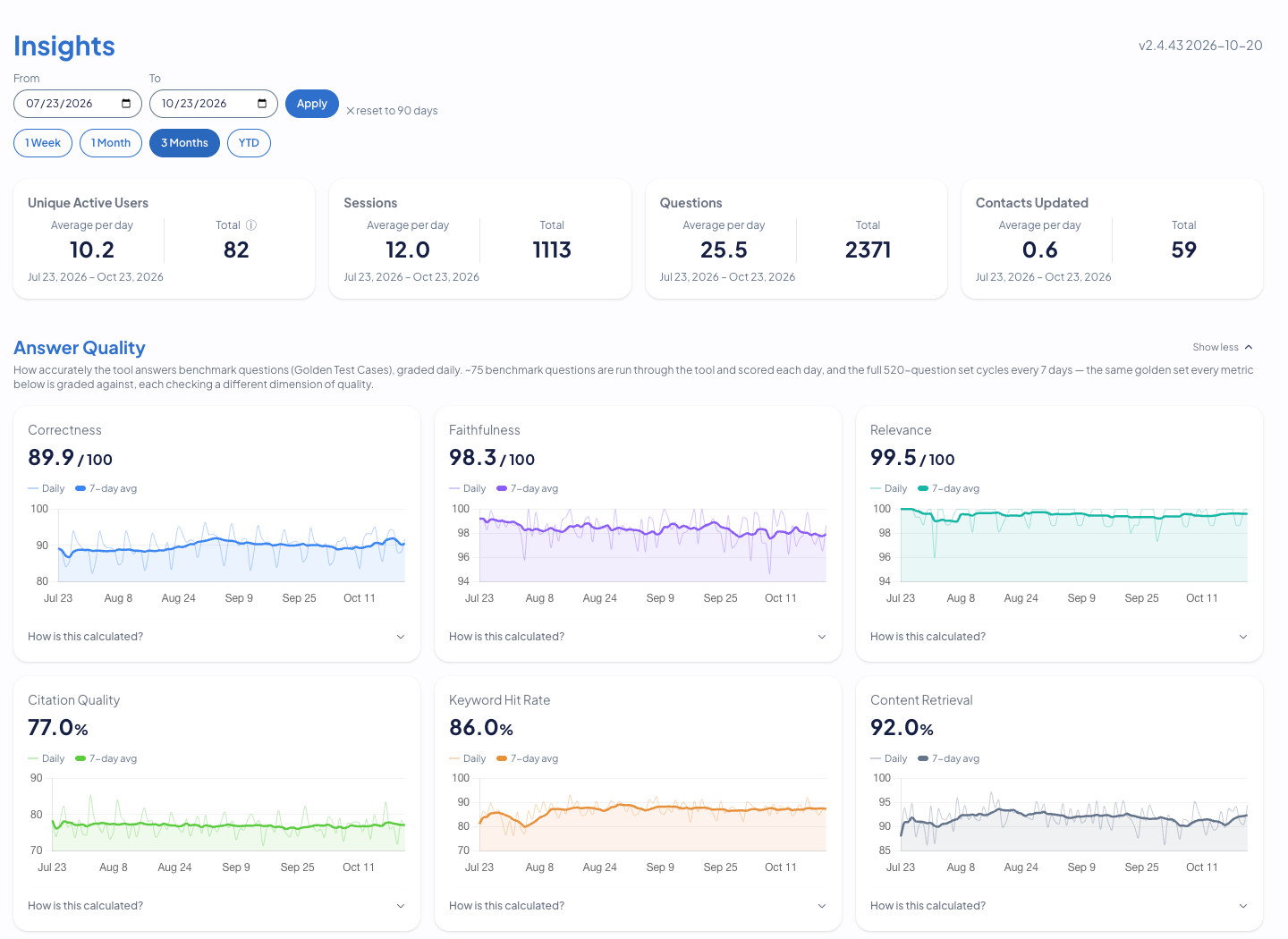
TMC-React's insights dashboard shows question themes, which SOPs are referenced most, which contacts are searched most frequently, and what operators are flagging. It's not just an audit trail — it's a continuous training signal.

When the same SOP section gets flagged twice in a week, the SOP probably needs updating. When RAVE notifications become the top query category, that tells a training coordinator exactly where to focus the next cycle. You learn what's working — and what isn't — from real usage, not from asking operators to fill out surveys.

Insights Dashboard — Question themes this week
RAVE Notifications 61%
Wrong-way driver protocol 22%
Bridge incident contacts 11%
Flags this week
3
SOPs updated
2
Active operators
98
Capabilities

Built for the TMC. Trusted by management.

TMC-React is purpose-built for the people and workflows of a 24/7 traffic operations center.

Always cited

Every answer links to its source

TMC-React never generates answers from thin air. Every response cites the specific SOP section, contact record, or route map it drew from. Operators can click through to the source document — the AI is a pointer, not a replacement for judgment.

Real-time sync

SOPs update, the tool updates

TMC-React connects to your existing document storage — OneDrive, SharePoint, or similar — and re-indexes every 15 minutes. When an SOP changes, operators are working from the current version, automatically. No manual uploads required.

Human-reviewed feedback

Flags go to people, not algorithms

Any operator can flag an answer that seems wrong with a thumbs-down. Beacon is notified immediately. Nothing changes automatically — a senior person reviews the feedback and decides whether the SOP needs updating. The tool doesn't learn from individual operators unsupervised.

Automated evaluation

520 test questions run every week

Beacon runs 520 golden Q&A pairs through TMC-React on a weekly cycle, tracking six RAG pipeline metrics: keyword retrieval, content retrieval, faithfulness (hallucination prevention), citation accuracy, relevance, and correctness. When something regresses, we know before you do.

Records-ready

Query history configurable to your retention policy

All operator interactions are logged. Retention is configurable to your agency's records management requirements — nothing lives on forever unless you want it to. The logs give you a defensible audit trail without creating an unbounded storage problem.

In Production

4.3 / 5 on confidence.
2.0 / 5 on finding the right SOP.

We surveyed operators before deployment. They knew their procedures. They couldn't find the right page fast enough during a live incident. That's the problem TMC-React is built to solve.

Since going live in April 2026, Operators have logged 3,195 traced interactions across 98 users. SOP questions are 61% of all queries — and RAVE notifications is the top category, which told leadership exactly where to focus the next training cycle.

"The feedback has been overwhelmingly positive. It's really helped them — it was something they really needed to be more productive and efficient."

Assistant State Traffic Engineer, flagship state DOT deployment
98 active operators
36.8 questions per day
98.0 faithfulness score
7 / 7 early adopters said helpful

Including overnight shifts. Operators use TMC-React at 2am without a supervisor present. That's not training adoption — that's a tool that works when the stakes are real.

FAQ

Questions we get in every demo.

Can't operators just use ChatGPT for this?

ChatGPT doesn't know your SOPs, your contacts, or your responder routes. It makes things up when it doesn't know something. And it doesn't log answers for audits. TMC-React only answers from your specific documents, stays behind your firewall, and logs every interaction — so you have a defensible record when you need one.

What happens when an SOP is updated?

TMC-React re-indexes every 15 minutes. When an SOP changes in your document storage, the tool reflects it automatically. No manual upload, no rebuild process, no lag. Operators are always working from the most current version of the documents.

What if the AI gives a wrong answer?

Operators flag it with a thumbs-down. Beacon is notified immediately. A senior person reviews the feedback against the actual SOP. If the SOP is wrong, we surface that too. Nothing updates automatically — humans make the call. When it's resolved, we let the operator know.

Who can update the contact database?

Designated admins have access to edit contact records directly in the tool. Changes go live immediately. Operators can also flag contacts as potentially outdated using the thumbs-down — those flags route to admins for review. The tool is designed for high-turnover contact environments.

How long does it take to deploy for a new TMC?

Pilot sites are live in 4–6 weeks. Day one: SOPs ingested. Day two: operators onboard. Week four: you have usage stats. The data sources are already yours — we just make them searchable and citable in a new way. Traffic can't wait, and neither should your deployment.

Does TMC-React work with our existing ATMS?

Yes. We're vendor-agnostic on purpose. TMC-React overlays any ATMS via API — no rip-and-replace, no waiting. Your existing systems stay in place, and you keep leverage in future procurements.

Get in Touch

Ready to see it on your own SOPs?

Send us a handful of SOPs and a contact list. We'll have a working prototype in front of your operators within days.

Start the conversation